Understand any financial model in Excel.
Trust every number in it.
Two focused Excel add-ins for the people who build and review company and asset valuations — one to see how any financial model is wired, one to audit it for errors before a client, an auditor, or the deal team does.
Built by a practising financial model auditor — because the tools that did this cost more than they should.
From US$21/year · Windows desktop Excel · installs without admin rights · your workbook never leaves your machine
Premium capability, without the premium invoice.
Pick up an inherited model in minutes
Open a valuation, an LBO or a budget you didn't build, trace precedents and dependents across sheets, and see exactly how the model hangs together — instead of reverse-engineering it cell by cell.
Catch the mistake before the IC does
Automatically flag hardcoded numbers buried in formulas and cells that break a row or column pattern — the errors that survive a manual review.
Half the price of Arixcel
FinExplorer costs half of Arixcel Explorer, and the bundle undercuts every audit-capable tool. Sold separately or together at a discount.
Your model never leaves your machine
Both add-ins read your workbook locally, inside your own copy of Excel. Your formulas, values and file names are never uploaded. The only thing that leaves your machine is the licence check itself.
Built for the people who live in valuation and deal models.
If your day is spent building, reviewing or signing off large Excel models, both add-ins were made for your desk — from a first DCF to a diligence model you inherited an hour ago.
Company & asset valuations
DCF, market multiples, purchase price allocation and impairment models — trace every driver and prove each number ties out before the valuation report leaves your desk.
Deal models under deadline
LBO, merger and accretion/dilution models built fast and reviewed faster — find the hardcode or the broken row before the deal team ever relies on it.
Diligence on models you didn't build
Open a target's model and understand how it's wired in minutes, then audit it for the errors a seller's analyst left behind.
Independent model review
Give client valuation and financial models a fast, repeatable quality check — hardcodes, inconsistent formulas, external links and errors, all flagged in one pass.
The fastest way to understand a model you didn't build.
FinExplorer turns a valuation or financial model's tangle of cross-sheet references into something you can actually follow — trace where a number comes from, where it flows, and how the whole model is wired, without leaving your spreadsheet.
- Trace precedents and dependents for any cell or range, then drill through the entire chain with a double-click.
- Break a nested formula apart — every argument, its live value, and the cell it points to, including IF branches and lookups.
- Formula Map color-codes a whole sheet to expose unique formulas, copied ranges, hardcoded inputs, and links to other workbooks.
- Compare two sheets with automatic row and column alignment, so an inserted row reads as one change — not a cascade of false differences.
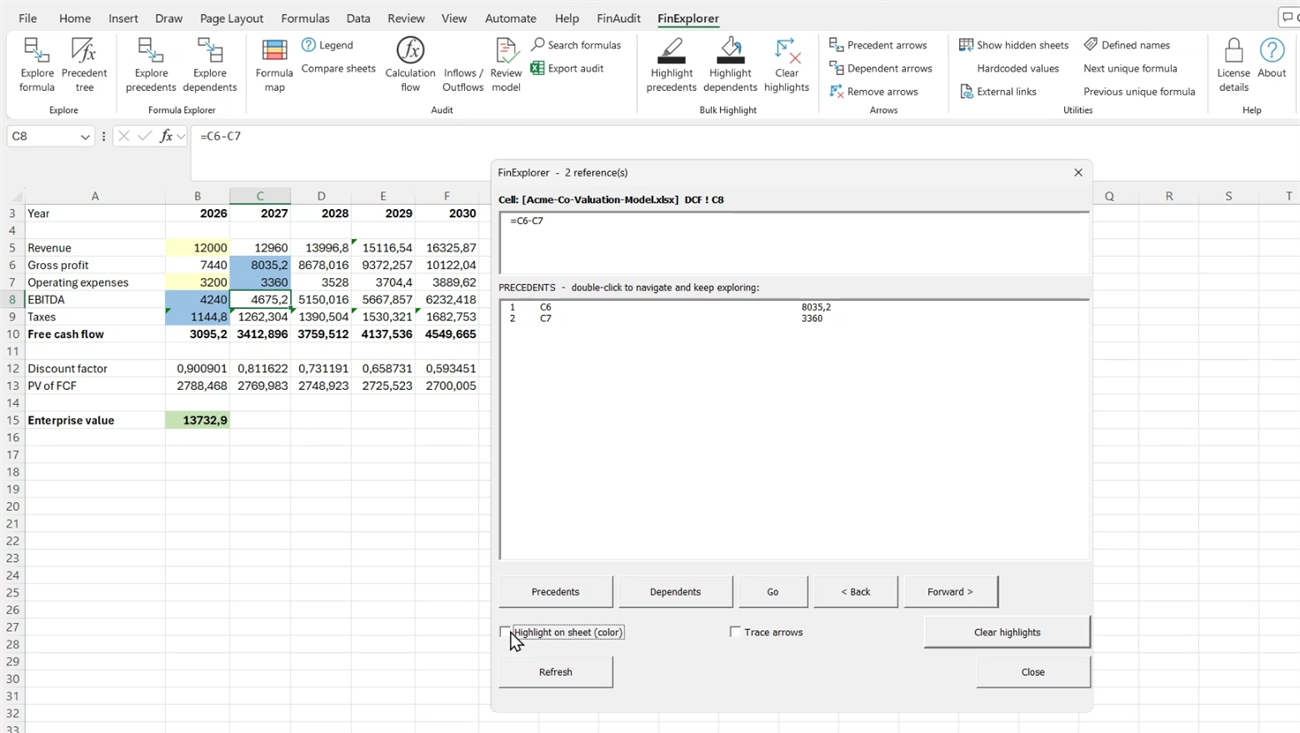
Real screen capture. C8 = C6-C7 on the DCF sheet, with both precedents listed and their live values — double-click either one to keep tracing.
Quality control for valuation & financial models.
FinAudit scans your workbook and flags the risks that slip past a manual review — the hardcoded tax rate in a DCF, the one broken cell in a projection row — so you find them before your MD, your client, or the investment committee does. Run it as the last check before a valuation or deal model goes out the door.
- Find hardcoded numbers buried inside formulas — the tax rate or margin typed straight into a calculation instead of an assumption cell.
- Rank findings by severity, so a hardcoded rate inside a multiplication rises above a harmless 0 or 1.
- Flag broken patterns — formulas that break the shape of their row or column, where one cell was edited and the rest were not.
- Scan the whole workbook in one pass, jump straight to any flagged cell, and clear every highlight in a single click.
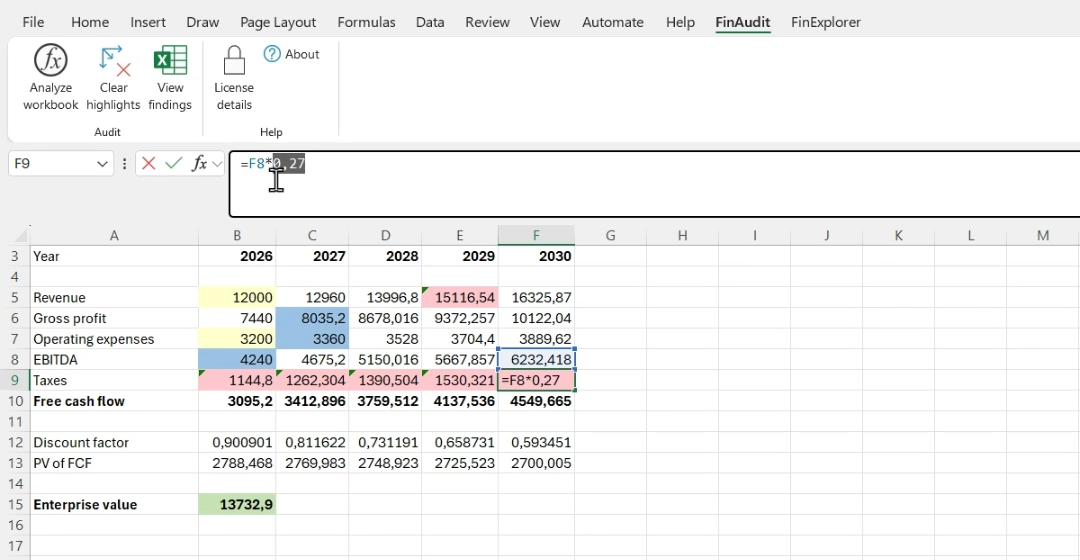
Real screen capture. The flagged cell in the Taxes row is =F8*0,27 — the tax rate typed into the formula instead of linked to Assumptions.
More capability than any of them. Less than all of them.
FinExplorer and FinAudit cover the same model-navigation and model-review work — and the bundle costs less per user, per year, than even the cheapest single competitor.
| Capability | valuation.clBundle | MacabacusProfessional | Operis OAKAudit kit | ArixcelExplorer |
|---|---|---|---|---|
| Formula navigation & tracing | Included | Yes | Yes | Yes |
| Automated hardcode / error audit | Included | Partial | Yes | No |
| Cross-sheet compare | Included | Yes | Yes | Yes |
| Workbook stays on your machine | Yes | Yes | Yes | Yes |
| Annual price, per user | US$35 | US$360 | ~US$400 | ~US$42 † |
Competitor prices verified from vendor pages, 19 Jul 2026. Macabacus is a broader Excel/PowerPoint/Word suite; OAK figure converted from GBP 311.66. † Arixcel Explorer offers formula navigation only — no automated model auditing. The valuation.cl bundle adds auditing and still costs less than a single Arixcel license.
Read the full FinExplorer vs Arixcel Explorer comparison → — including the cases where Arixcel is still the better buy.
Simple, annual, per user.
Buy either add-in on its own, or take both in the bundle and save. Every plan includes updates and support for the year, a free trial, and a 30-day money-back guarantee.
Navigate and understand any model, fast.
per user · per year
- Precedent & dependent tracing
- Formula breakdown & navigation history
- Formula Map & sheet compare
- Updates & support for 12 months
Both add-ins — navigate and audit every model.
per user · per year
Save US$7 vs. buying separately- Everything in FinExplorer
- Everything in FinAudit
- One license, one invoice
- Both tools for less than one Arixcel license
Audit a model before it reaches a client.
per user · per year
- Hardcode & constant detection
- Severity ranking of findings
- Broken-pattern detection
- Updates & support for 12 months
What finance teams ask first.
Is this useful for company or asset valuations?
Yes — that is exactly the work both add-ins were built for. Whether you value companies (DCF, market multiples, LBO) or individual assets (impairment, purchase price allocation, real-estate or infrastructure models), FinExplorer shows how every driver flows through the model and FinAudit audits it for hardcodes and broken formulas before the valuation report goes out.
Does my spreadsheet data ever leave my computer?
No. Both add-ins read your formulas locally through your own installation of Excel. Nothing about your model is uploaded, and no data is sent to us or to any third party. What you audit stays on your machine.
Do the add-ins work offline?
Almost entirely. All the analysis happens inside Excel on your own machine, and your workbook is never uploaded. The one thing that needs a connection is the licence check: starting the free trial requires internet once, and a licensed copy checks in periodically. After a successful check both add-ins keep working offline for up to 7 days, so a flight or a few days behind a locked-down corporate network are no problem.
How does the license work, and does it renew?
Licensing is annual and per user, and it renews automatically each year so your tools never stop working mid-engagement. There is no long-term contract: cancel any time in one click from the customer portal linked in your receipt, and you keep full access until the period you have already paid for ends. Every charge, including a renewal, is covered by the 30-day money-back guarantee.
What do the add-ins change in my workbook?
Nothing that you cannot undo, and never a formula or a value. Tracing draws arrows on screen. Highlighting a finding changes a cell's fill colour and nothing else — and Clear highlights restores the original colours, including cells that had no fill to begin with. Your formulas, values, names and formatting are never rewritten. FinAudit reports what it finds; it does not fix anything on your behalf, because deciding whether a hardcode is a mistake is your judgement, not a tool's.
Do I need administrator rights to install?
No. Both add-ins install without administrator rights — the installer copies two files into your own Excel startup folder and nothing else. No MSI, no registry changes beyond your own user, no IT ticket. That matters if you work somewhere locked down, like a bank or an audit firm.
Is a license per user or per team?
Per user, on one computer at a time. Changing machine doesn't mean buying again: click Deactivate this PC in the License details dialog and your license is free to activate on the new one — and if the old computer died, email us and we'll release it for you. For a desk or team, buy one seat per user — email support@valuation.cl and we'll arrange a single order and one invoice for the whole group.
Is there a free trial or a refund?
Both. You can try the add-ins free before you buy, and every purchase is backed by a 30-day money-back guarantee. If they don't fit the way you work, tell us within 30 days and we'll refund you.
Which versions of Excel are supported?
Desktop Excel for Windows — Microsoft 365 and recent perpetual releases (2016, 2019, 2021, 2024). Both add-ins install without administrator rights, so you can be running in minutes without an IT ticket.
See it on your own model in the next five minutes.
Install without admin rights, open a workbook you already know, and watch it trace — and flag — every number.